PRODUCT VIEW
Current dashboard
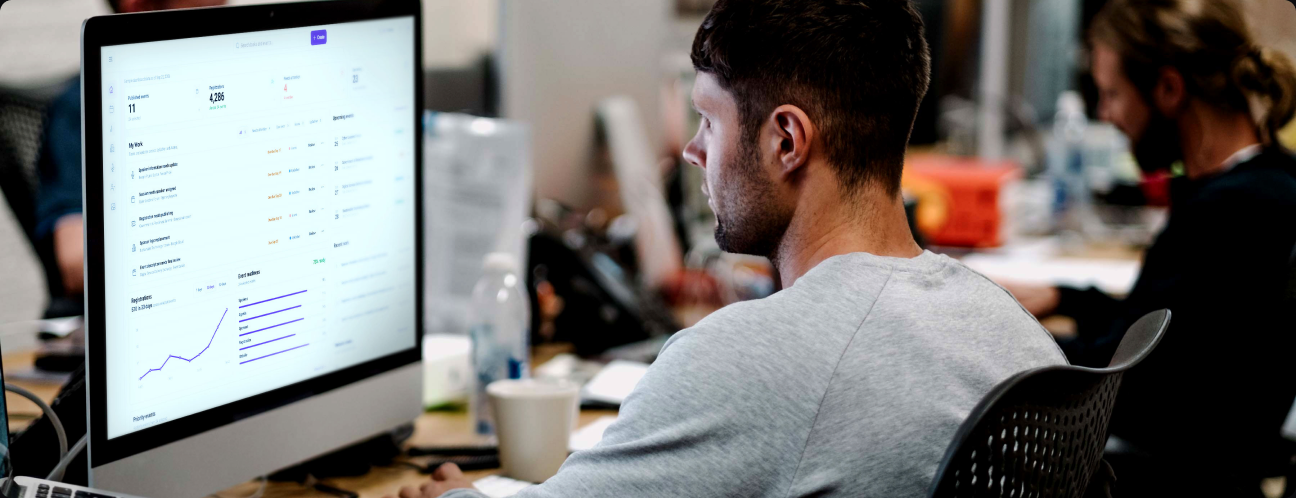
My Work, event readiness, and upcoming events bring operational context into one workspace. Shown as product evidence; no outcome attribution is implied.
RESEARCH & DISCOVERY
UpGather connects event creation, registration, speakers, sponsors, and publishing. The design challenge was helping teams coordinate that work and see what needed attention next.
Product
Upgather - Event SaaS Creator
My role
Principal Product Designer
Format
Product design & prototyping
Focus
Enterprise UX, Experience architecture
I used workflow analysis, stakeholder input, prototype iteration, and implementation feedback to shape a clearer operational workspace. These are project signals and design interpretation, not a formal participant study.
RESEARCH METHODS
01

WORKFLOW ANALYSIS
Reviewed end-to-end workflows across Events, Speakers, Sponsors, Agenda, Registration, Members, Organizations, Invitations, analytics, and publishing.
02

STAKEHOLDER DISCOVERY
Translated evolving business, customer, product, and technical requirements into workflows, interaction models, and product direction.
03

COMPETITIVE / DESK RESEARCH
Framed comparisons around event creation, operational context, and workflow continuity; benchmark results are not available in the project record.
04

PROTOTYPE ITERATION
Created and refined high-fidelity concepts for dashboards, event creation, side panels, registration, sponsors, members, organizations, and related experiences.
05

DESIGN-SYSTEM AUDIT
Reviewed typography, spacing, status patterns, list rows, components, and interaction consistency across UpGather.
06

IMPLEMENTATION QA
Compared Figma designs against the built application and worked with Engineering to resolve visual and interaction differences.
DESIGN SIGNALS
01
FRAGMENTED WORK
Project materials describe work spread across UpGather, Asana, email, spreadsheets, and other systems.
02
LOW VISIBILITY
Event teams needed a clearer view of what still needed attention before an event was ready.
03
INCONSISTENT PATTERNS
Similar workflows showed differences in typography, spacing, status, hierarchy, and interaction patterns.
04
NAVIGATION FRICTION
Navigation could make it hard to locate the right place to update work.
05
NO CLEAR NEXT STEP
Information was available, while the next useful action was not always clear.
06
DESIGN-TO-BUILD FRICTION
Figma-to-product differences called for more implementation review and correction.
DESIGN INTERPRETATION
Users didn't need more features. They needed the system to tell them what mattered next.
A synthesis of documented workflows and project input—not a verbatim participant quote.
SIGNALS
→
Tasks, event status, integrations and user activity
PRIORITIZATION
→
Role, urgency, deadline and event impact
CONTEXTUAL GUIDANCE
→
Surface what needs attention
DIRECT ACTION
Take the user directly to the work
This interpretation shaped a product direction: bring priorities into the working context, then make the next step easy to reach.
Operational context
Event readiness
Next action
Workflow continuity
RESEARCH ARTIFACT
Existing dashboard view
Operational workspace
The workspace brings task status, registration activity, and event readiness into one operational view.
Existing event workflow view
Event list and details
The event list and detail panel keep status, agenda, speakers, registration, and sponsors close to the selected event.
Mapping the end-to-end event lifecycle to surface where work branched across tools and roles.
Workflow analysis · Research method 01
RESEARCH NOTE
The available project record describes workflow analysis, stakeholder input, design iteration, design-system review, and implementation feedback. It does not include a formal participant study, named competitive benchmarks, test results, or measured outcomes.
PRODUCT DIRECTION · DESIGN DECISIONS
I translated the design interpretation into a workspace that brings My Work, task status, event readiness, and contextual actions into view instead of scattering them across navigation.
My Work, event readiness, and upcoming events bring operational context into one workspace. Shown as product evidence; no outcome attribution is implied.
Explore the dashboard and event workflows. This interactive design prototype communicates responsive behavior and is not a shipped product.
A concept for surfacing task status, event readiness, upcoming work, and contextual signals in one workspace. Personalization and AI assistance remain concept directions.
MY ROLE & OWNERSHIP
As Principal Product Designer, I carried the experience from North Star direction through detailed interaction design, prototypes, design-system work, and implementation support.
01 I led
02 I designed
03 I partnered
HOW I WORKED
Principal Product Designer
↔
Product
Engineering
Data / AI
Content / Editorial
Business stakeholders
I worked directly with Engineering throughout design and implementation, using prototypes, Figma, Storybook, repository workflows, MCP-based handoff, and visual QA to reduce the gap between design intent and the built product.
DESIGN → BUILD WORKFLOW
Reviewed end-to-end workflows across events, speakers, sponsors, agenda, registration, members, organizations, invitations, analytics, and publishing.
DELIVERY & EVIDENCE
The strongest evidence here is product direction carried into workflow concepts, detailed design, and an interactive prototype.
Operational workflow concepts, responsive interaction patterns, shared Figma components, specifications, and implementation reviews.
The gallery labels the existing product view, interactive design prototype, and North Star concept separately. The prototype is not presented as a shipped feature.
The available project record does not include launch, adoption, conversion, or task-time results, so none are claimed here.
REFLECTION This work shows how I connect product direction with hands-on design: making complex event operations easier to navigate and carrying those decisions through engineering review.